Back
Building Financial Reports with Numeric
About
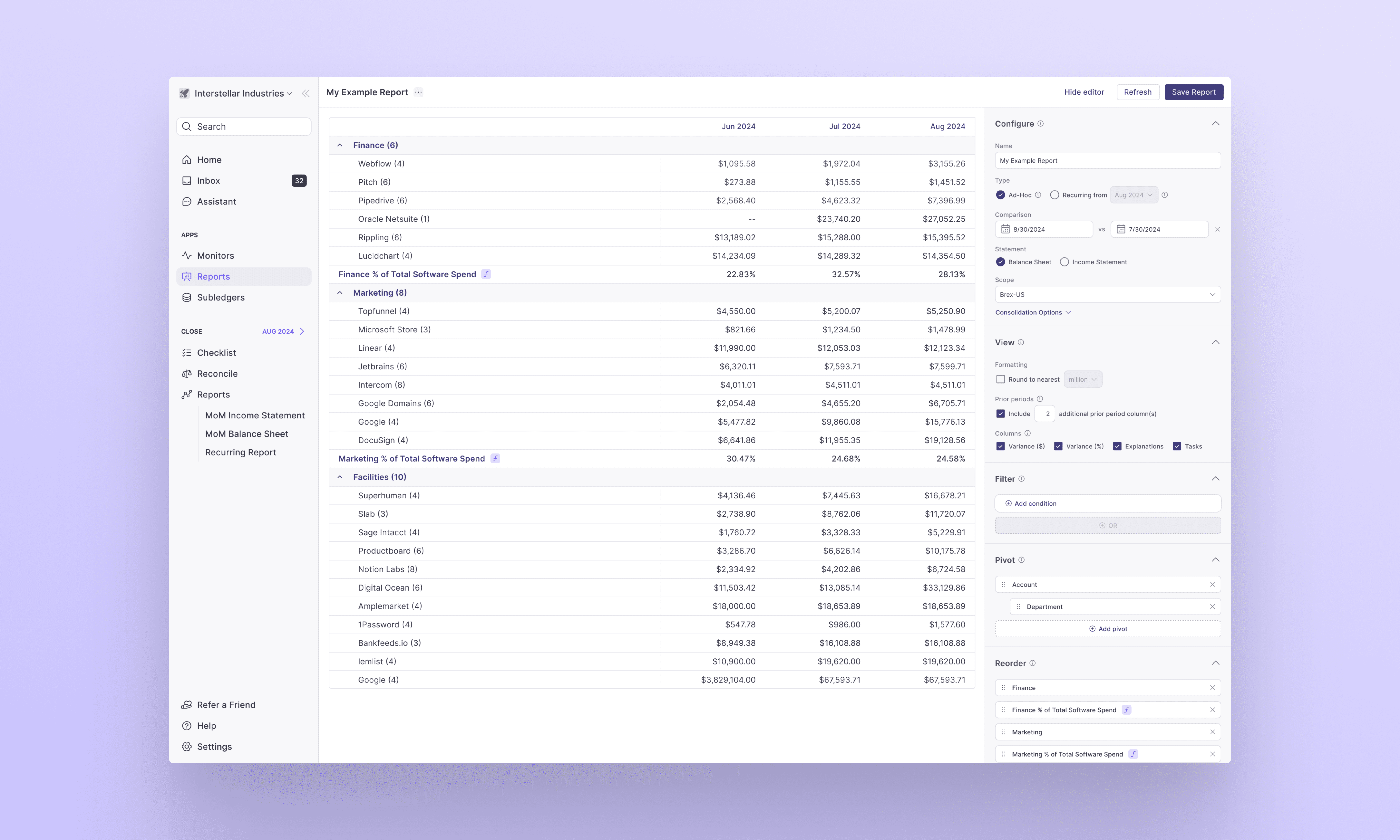
Numeric’s Reports feature provides accounting and finance teams with a flexible and simple interface to customize and prepare complex financial reports from scratch. This feature entirely eliminates Excel from the user’s process, and is built to accommodate all the details, including currencies, consolidations, and metric calculations.
My role involved setting up brainstorming sessions with the engineering team, hosting user research sessions with new and existing customers, organizing ideation and design reviews with Numeric’s CPO and CEO, and of course, designing the feature end-to-end.
Problem
Financial reports are designed to guide business decisions using financial data, but this data is often fragmented and inaccurate. The main cause of this is the manual handling of data entry, error correction, and transformations, typically done in Excel. Companies rely on Excel because the alternative—creating reports directly in outdated and unintuitive General Ledger systems like NetSuite—is even more cumbersome.
Accountants rely on financial reports, but the previous report builder lacked customization and granular editing, leading them to use Excel. Improving this feature was crucial to keeping users in the Numeric app and fully supporting their workflow.
Target Customer
Accountants in accounting teams of 5-20 people, who:
Follow a month-end close process,
Report to a CFO,
Use Excel or other digital applications to complete accounting-based tasks
Pain Points
Report data is fragmented across multiple systems (ERP, NetSuite, marketing tools, etc.), requiring accountants to log into multiple platforms and manually consolidate information. As a result, Accountants will often have multiple tabs of information open, which they later paste into a shared Excel sheet as they formulate the financial report, resulting in inaccurate, error-prone data.
Solution
A straightforward, side-pane interface that guides users through report creation step-by-step, providing both basic and advanced options.
Numeric retrieves every transaction line directly from all connected data sources to maintain accuracy, allowing users to manage all data in one place. The manual controls on the right side of the report builder enable users to configure and adjust the data as needed, ensuring they can extract the necessary information for their report. For example, users can extract marketing department data when creating a “Marketing Spend” report.
Designing this feature was truly a 0-to-1 project, as there are no other tools that offer such granular controls in the market today. Within the first week of our beta launch, we had 5 of our biggest customers opt into using the builder, and sharing their feedback. Out of these 5 customers, 4 had created more than 2 financial reports without any requests for help or intervention from the team.
This feature set the product apart from competitors, and demo-ing it alone secured signed deals with customers such as Figma, Brex, and Plaid.
More